The 5 Silent Failures in Data Pipelines
Hi, fellow future and current Data Leaders; Ben here 👋
After putting together the data pipeline foundations piece last week I realized there was another topic I really wanted to cover.
That is, the silent ways your data pipelines can fail while injecting bad data into your dashboards and reports.
But before diving into that, here is the truth.
Your snowflake bill is bigger than it should be.
Most cost optimization advice stops at “set auto-suspend to 60 seconds.” This guide doesn’t. Greybeam’s free Snowflake Cost Optimization Guide walks you through 10 checks that can cut 30–60% of your costs with the exact SQL to run against your account today.
10 Snowflake cost checks across warehouses, queries, and storage
Copy-paste SQL queries you can run in your account
Know exactly where you’re spending the most and how to fix it
The greatest cloud savings emerge from costs never born. This guide helps you find the spend most teams overlook, fix it, and put guardrails in place so it stays that way.
Read the free guide - Get a demo
Thanks so much to Greybeam for supporting the Seattle Data Guy, and now, back to our article!
It’s 4:57 PM on a Friday, and a junior analyst noticed something odd.
The numbers in this week’s dashboard looked exactly like last week’s.
Not just similar.
Not kind of close.
Identical.
The pipeline had been silently recycling stale data for seven days, and nobody had a clue(until the CFO notices on a Monday morning).
Of course, maybe there is another story here about the fact that no one noticed that the data was stale, but let’s not get into that.
One of the challenges with data pipelines is that they can fail without anyone noticing.
Dashboards might only be looked at once a month.
Data can “look” right.
Pipelines can run without triggering any failure or red flag.
And what’s worse is that it can happen in multiple ways. In this article, I wanted to discuss the ways pipelines can fail silently and what you can do about it.
1. Schema Drift
If you’re loading data from SFTP, one of the file types you might be provided is headerless.
Meaning you’re trusting that another team, often in a different company, will load the data correctly.
And let me tell you….
I’ve had SFTP pipelines that have worked for months without a single problem. Then, for one reason or another, the CSV of XML you’ve been getting changes suddenly. And if you aren’t ready for that schema drift, you might be in for a surprise when suddenly you’re getting in physician name where city used to be.
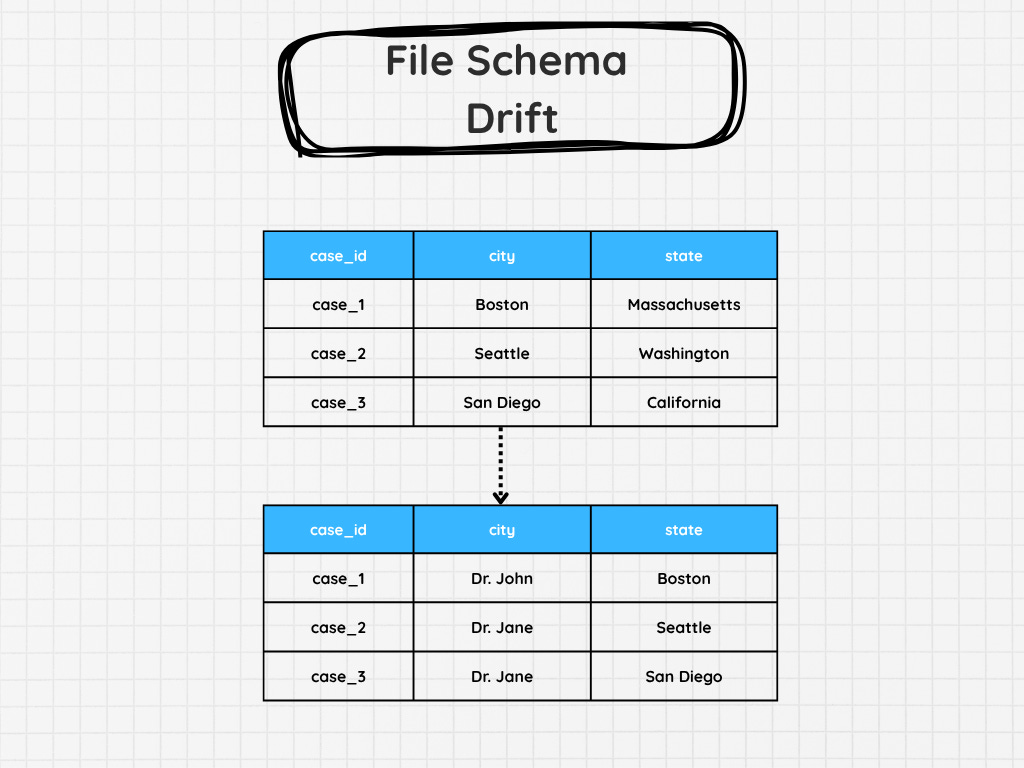
There might not be any specific failure, as all the other data types might be correct. So the pipeline will say it’s correct. Unless you’ve got something to check and ensure the data is an expected set of fields, length, or type, you would never even know!
Not until you’re looking at the data itself. There are, of course, other types of schema drift, such as when tables in your Postgres instance drop or add columns, which can also break your pipeline. But those tend to be noisier and cause issues.
2. Partial Data Loads That Look Complete

Picture this.
You set up an API data extract.
On the first day, it pulls in all the data. It’s about 8,142 rows.
Great. The next day it pulls in 8,213 rows, then the next a few more, etc, etc.
Then, a few weeks later, someone brings up that the pipeline hasn’t been updated in a while. You’re confused. You check your logs, and it says the pipelines run successfully?
Looking at the data, you notice something strange. The last few days, your pipeline has been pulling in exactly 10,000 rows.
But the API didn’t complain or throw an error. It just stopped working.
This can happen. Not every API will tell you about its rate limits. Sometimes, they just stop.
Leaving you with a partial data load.
That’s why I am always suspicious of perfectly round row counts, and also strange powers of 2, like 65,536. I actually had one instance where a system was set up to never allow a larger data extract than 2^16. I wonder if my readers know why this specific limit exists in some cases….
This can also happen with late-arriving fact data, where you might only be pulling for a specific data window.
It’ll likely look different as the row counts will be more random, but when you try to tie them out to your source, they will be wrong.
3. The Data Is Not Fresh
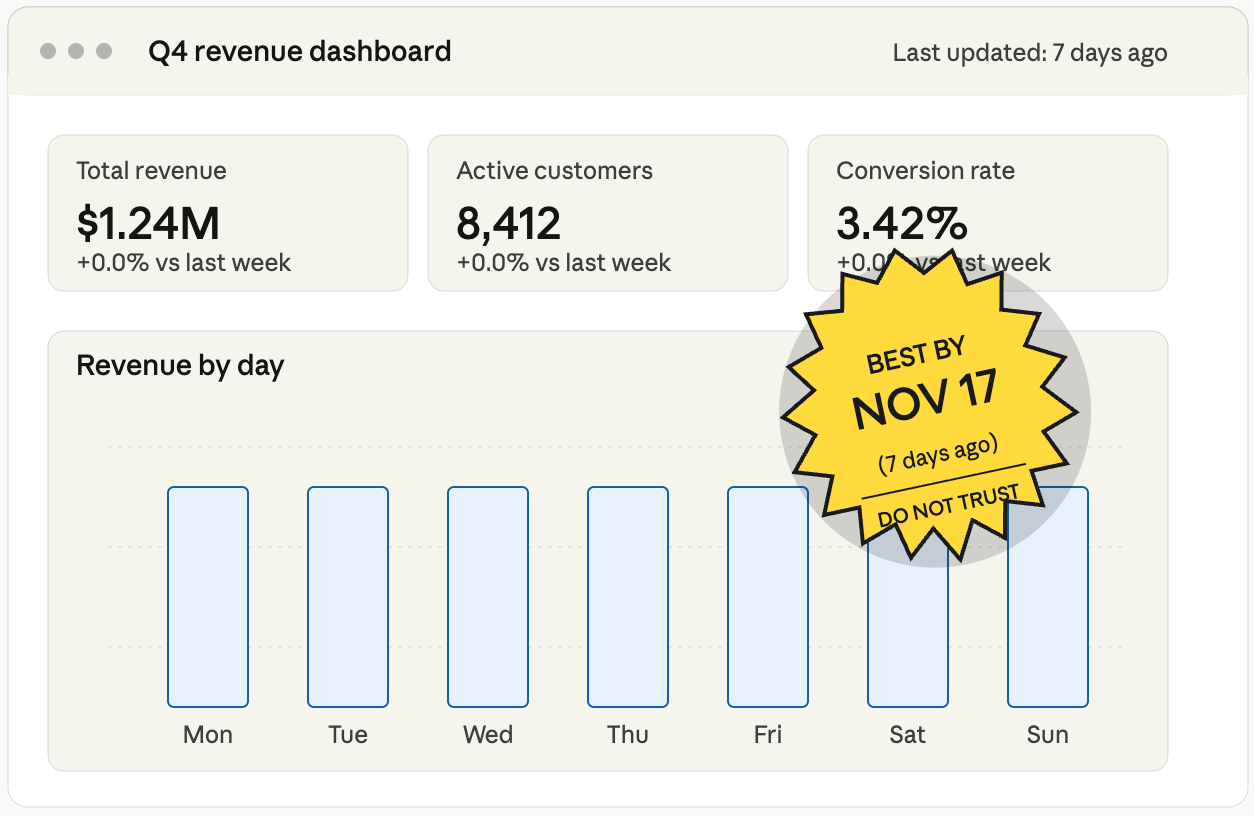
Reaching back to the example from the start of the article, it’s not uncommon for data to become stale.
With the SFTP example, you might be expecting an external partner to send you data daily. Well, their automation fails. Yours keeps running and succeeds because you don’t have any data quality issues or just an operational check that ensures that new data is being populated.
Guess what…
No one will notice until it’s been a few days.
Sometimes it’s a great way to learn which dashboards are being looked at…I guess.
Jokes aside. The SFTP example is just one example. You could have your source database fail to update, or maybe the replica it’s attached to. Sometimes, someone somewhere hard-coded a max date to your API extract, so it never goes past it.
Honestly, there are so many ways your data can end up getting stale.
It’s why many analysts and data engineers put checks as well as notifications on dashboards to let people know.
Hey, this data hasn’t been updated since yesterday!
It’s at least one way to inform an end-user that the information they are looking at isn’t updated.
SeattleDataGuy’s Newsletter is a reader-supported publication. To receive new posts and support my work, consider becoming a free or paid subscriber.
4. Late-Arriving Dimensions
Sometimes, software teams will store categorical data outside of the database. For example, at Facebook, one issue my team ran into was that the team that managed the leave and paid time off application would occasionally add new types of leaves and PTO. But all of that was stored in an enumerator.
And all we would get was an ID that we had to map.
Now the real fix was obviously to move that to a table, but that never happened.
So what happens when a new leave type gets added, and your pipeline doesn’t know about it yet?
You get NULL.
This can have lots of unintended downstream impacts:
Sales get attributed to “Unknown Customer” instead of the right segment
Regional reports look understated for days, then suddenly spike when dimensions catch up
ML models train on NULLs or placeholder values without anyone knowing
But the pipeline succeeded, right?
5. The Logic That Was Never Wrong….Until It Was
When you first write your data pipeline logic, it might work fine on your current data set.
Your tests look good, nothing breaks, and all your output ties out as expected. But just because your current logic is right doesn’t mean it can’t break.
A very simple example could be something like you needing to bucket customers into tiers.
So you decide to break them down into Platinum, Gold, Silver, and Bronze. You hardcode the thresholds because, well, that’s what the business told you. $100k, $50k, $10k.
Great, that’s done.
Then, sales launches an enterprise tier. Or inflation happens. Or the company expands into a new country where the currency conversion makes every customer look like Gold.
Now, is your logic wrong?
The same thing happens with:
Hardcoded date ranges (”WHERE year >= 2020” was fine until it wasn’t)
Exchange rates that someone dropped into a lookup table once and forgot about
Tax logic that doesn’t account for a new jurisdiction
Product categorizations that made sense before the company pivoted
Everything will continue to run, and data will get produced.
And the worst part?
There’s usually no error to catch because the logic is technically doing exactly what you told it to do…
Final Thoughts
The scariest part about these pipeline failures isn’t that they wake you up at 2 A.M.
It’s that they don’t.
No…these errors go on for months without anyone noticing until the CFO asks a question in a board meeting.
And don’t even get me started with time zones.
Well, hopefully I didn’t scare y’all too much.
Thanks to all for reading!
Articles Worth Reading
There are thousands of new articles posted daily all over the web! I have spent a lot of time sifting through some of these articles as well as TechCrunch and companies tech blog and wanted to share some of my favorites!
Schema Drift in Snowflake Pipelines and How to Handle It
Schema drift in Snowflake occurs when source schemas change without downstream updates, resulting in pipeline failures and rising costs. This article explains how to handle Snowflake schema evolution reliably.
The word “drift” suggests some kind of gentle, gradual process. And when you think about it, schema drift is exactly that. Just like snowflakes that accumulate, small schema changes compound over time, until one day, a machine learning job fails or a successful pipeline produces wrong metrics. The main causes of this are column-level changes (such as additions, deletions, or modifications) or changes to a column’s data type.
Insurance carriers quietly back away from covering AI outputs
Many insurers have begun to exempt AI workloads from cybersecurity and errors and omissions coverage, saying their outputs are too unpredictable to write policies around.
Several major insurance carriers have begun to back away from providing cybersecurity and other insurance to companies using AI to run internal processes, insiders say.
While there’s no standard response to customer use of AI in the insurance market, many carriers are now quietly declining to write policies for claims related to AI-generated outputs in cybersecurity and errors and omissions (E&O) coverage, these observers say. Other insurance carriers are jacking up prices to cover AI-related claims, they say.
Take Your Experience to the Next Level
NewDownload our mobile app for a faster and better experience.
Comments
0Join the discussion
Sign in to leave a comment